Crypto Mining with Duino-Coin, Display Stats on Round LCD TFT Display
Monitor your Duino-Coin mining stats in real time using an ESP32 and a GC9A01 1.28-Inch Round LCD TFT Display. View hashrate, shares, and node directly from your device.
Project Demo
What You Need
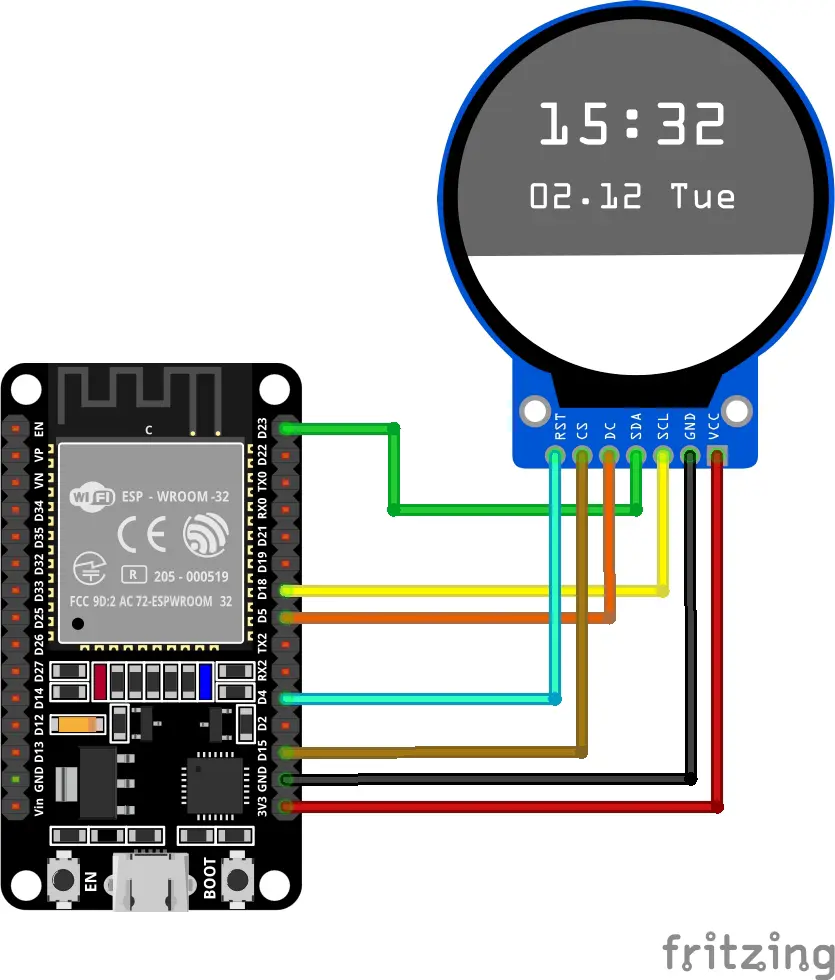
Wiring
| TFT Pin | ESP32 GPIO |
|---|---|
| VCC | 3.3V |
| GND | GND |
| SCL | GPIO 18 |
| SDA | GPIO 23 |
| DC | GPIO 05 |
| CS | GPIO 15 |
| RST | GPIO 04 |
How to Build It
Connect the hardware
Connect the TFT display to the ESP32 using jumper wires. VCC to 3.3V, GND to GND, SCL to GPIO 18, SDA to GPIO 23, DC to GPIO 05, CS to GPIO 15, RST to GPIO 04.
Go to duinocoin.com
Create an account. Click on Get Started and follow the instructions for the esp32 board. Unzip the folder and open the main ino in Arduino IDE. Replace the DisplayHal.h header file with the new DisplayHal.h provided.
Install required libraries
Open the Arduino IDE and go to Sketch - Include Library - Manage Libraries. Search for and install the Adafruit GC9A01A, TridentTD_EasyFreeRTOS32 and Adafruit GFX libraries.
Upload the sketch
Download the sketch from GitHub. Select the correct board and port from Tools, then click Upload.
Monitor your mining stats
The TFT display will show your current mining statistics including hashrate, number of shares, and node directly from your ESP32.
The Code
The full sketch is available on GitHub. Below are the key code sections for integrating the TFT display into your Duino-Coin miner.
// DisplayHal.h - GC9A01 Round 240x240 Display
// Duino-Coin ESP32 Miner - Custom build
// Includes tachometer ring that scales with kH/s hashrate

#ifndef DISPLAY_HAL_H
#define DISPLAY_HAL_H

#include <Arduino.h>
#include <SPI.h>
#include <Adafruit_GFX.h>
#include <Adafruit_GC9A01A.h>

// ---- Pin definitions ----
#define TFT_DC   5
#define TFT_CS   15
#define TFT_RST  4
// SCL = GPIO18, SDA = GPIO23 (hardware SPI)

Adafruit_GC9A01A tft = Adafruit_GC9A01A(TFT_CS, TFT_DC, TFT_RST);

// ---- Color palette ----
#define BLACK       0x0000
#define WHITE       0xFFFF
#define DUCO_GOLD   0xFD20
#define DUCO_GRAY   0x7BEF
#define DUCO_DARK   0x2945
#define DUCO_GREEN  0x07E0
#define DUCO_CYAN   0x07FF
#define DUCO_RED    0xF800
#define DUCO_ORANGE 0xFC60
#define DUCO_YELLOW 0xFFE0

// ---- Display center & radius ----
#define CX 120
#define CY 120
#define OUTER_R   118   // outer edge of tachometer ring
#define INNER_R   104   // inner edge of tachometer ring
#define CONTENT_R  98   // safe area for content

// ---- Tachometer config ----
// Ring sweeps from 135° to 405° (270° arc), clockwise
// 0 kH/s = no fill, MAX_KH = full ring
#define TACHO_START_DEG  135
#define TACHO_SWEEP_DEG  270
#define MAX_KH           200.0   // adjust to your typical max hashrate

// ---- Helper: degrees to radians ----
inline float degToRad(float deg) { return deg * PI / 180.0; }

// ---- Draw tachometer ring ----
void drawTacho(float kh) {
    float pct = kh / MAX_KH;
    if (pct > 1.0) pct = 1.0;
    if (pct < 0.0) pct = 0.0;

    int filledDeg = (int)(pct * TACHO_SWEEP_DEG);

    for (int deg = 0; deg < TACHO_SWEEP_DEG; deg++) {
        float angle = degToRad(TACHO_START_DEG + deg);
        float cosA = cos(angle);
        float sinA = sin(angle);

        uint16_t color;
        if (deg > filledDeg) {
            color = DUCO_DARK;
        } else {
            float zonePct = (float)deg / TACHO_SWEEP_DEG;
            if (zonePct < 0.5)       color = DUCO_GREEN;
            else if (zonePct < 0.75) color = DUCO_YELLOW;
            else if (zonePct < 0.9)  color = DUCO_ORANGE;
            else                     color = DUCO_RED;
        }

        for (int r = INNER_R; r <= OUTER_R; r++) {
            int px = CX + (int)(r * cosA);
            int py = CY + (int)(r * sinA);
            tft.drawPixel(px, py, color);
        }
    }
}

// ---- Draw WiFi signal bars ----
void drawWifiBars(int x, int y) {
    int rssi = WiFi.RSSI();
    int bars = (rssi > -40) ? 4 : (rssi > -60) ? 3 : (rssi > -75) ? 2 : 1;
    for (int i = 0; i < 4; i++) {
        int barH = 4 + i * 3;
        int barY = y + 12 - barH;
        uint16_t color = (i < bars) ? DUCO_GREEN : DUCO_DARK;
        tft.fillRect(x + i * 5, barY, 4, barH, color);
    }
}

void screen_setup() {
    tft.begin();
    tft.setRotation(0);
    tft.fillScreen(BLACK);
}

void display_boot() {
    tft.fillScreen(BLACK);
    drawTacho(0);
    tft.setTextColor(DUCO_GOLD);
    tft.setTextSize(2);
    tft.setCursor(52, 85);
    tft.print("Duino");
    tft.setCursor(58, 108);
    tft.print("Coin");
    tft.setTextColor(WHITE);
    tft.setTextSize(1);
    tft.setCursor(88, 135);
    tft.print("v");
    tft.print(SOFTWARE_VERSION);
    tft.setTextColor(DUCO_GRAY);
    tft.setTextSize(1);
    tft.setCursor(38, 155);
    #if defined(ESP8266)
        tft.print("ESP8266");
    #elif defined(CONFIG_FREERTOS_UNICORE)
        tft.print("ESP32-S2/C3");
    #else
        tft.print("ESP32 WROOM-32D");
    #endif
}

void display_info(String message) {
    tft.fillScreen(BLACK);
    drawTacho(0);
    tft.setTextColor(DUCO_GOLD);
    tft.setTextSize(2);
    tft.setCursor(52, 85);
    tft.print("Duino");
    tft.setCursor(58, 108);
    tft.print("Coin");
    tft.setTextColor(WHITE);
    tft.setTextSize(1);
    int msgX = CX - (message.length() * 3);
    if (msgX < 10) msgX = 10;
    tft.setCursor(msgX, 148);
    tft.print(message);
}

void display_mining_results(String hashrate, String accepted_shares, String total_shares,
                             String uptime, String node, String difficulty,
                             String sharerate, String ping, String accept_rate) {

    float kh = hashrate.toFloat();
    drawTacho(kh);
    tft.fillCircle(CX, CY, CONTENT_R - 1, BLACK);

    drawWifiBars(54, 52);

    tft.setTextColor(DUCO_GRAY);
    tft.setTextSize(1);
    tft.setCursor(152, 58);
    tft.print(ping + "ms");

    tft.setTextColor(DUCO_GREEN);
    if (kh < 10.0) {
        tft.setTextSize(4);
        tft.setCursor(82, 98);
    } else if (kh < 100.0) {
        tft.setTextSize(4);
        tft.setCursor(64, 98);
    } else {
        tft.setTextSize(3);
        tft.setCursor(55, 102);
    }
    tft.print(hashrate);

    tft.setTextColor(DUCO_GRAY);
    tft.setTextSize(1);
    tft.setCursor(97, 130);
    tft.print("kH/s");

    tft.setTextColor(DUCO_CYAN);
    tft.setTextSize(1);
    int nodeX = CX - (node.length() * 3);
    if (nodeX < 14) nodeX = 14;
    tft.setCursor(nodeX, 75);
    tft.print(node);

    tft.setTextColor(WHITE);
    tft.setTextSize(1);
    String sharesStr = accepted_shares + "/" + total_shares;
    int sharesX = CX - (sharesStr.length() * 3);
    tft.setCursor(sharesX, 148);
    tft.print(sharesStr);

    tft.setTextColor(DUCO_GRAY);
    tft.setTextSize(1);
    tft.setCursor(CX - 12, 160);
    tft.print("(" + accept_rate + "%)");

    tft.setTextColor(DUCO_GRAY);
    tft.setTextSize(1);
    tft.setCursor(48, 148);
    tft.print("d:" + difficulty);
    tft.setCursor(48, 160);
    tft.print(sharerate + "/s");

    tft.setTextColor(DUCO_GOLD);
    tft.setTextSize(1);
    int uptimeX = CX - (uptime.length() * 3);
    tft.setCursor(uptimeX, 178);
    tft.print(uptime);

    tft.setTextColor(DUCO_DARK);
    tft.setTextSize(1);
    String ip = WiFi.localIP().toString();
    int ipX = CX - (ip.length() * 3);
    tft.setCursor(ipX, 190);
    tft.print(ip);
}

#endif
Want to learn the fundamentals first?
The free Introduction to Arduino course on DevSTEM covers everything you need before tackling projects like this.
Start the Course